
30 Minutes Offline vs 1 Minute: Why Commercial NAS Is a Hidden Operational Risk
30 minutes of downtime on a Synology update vs 1 minute on TrueNAS. The difference isn’t technology — it’s architecture.
30 minutes of downtime.
Sites offline. Critical services down. Clients unable to access.
And the question you don’t want to ask: “Will the backup work?”
Because backups that never failed in testing can fail precisely when you need them most.
Andrew Miller learned this the hard way.
The profile
Andrew Miller, 42 years old
Independent consultant, Lisbon resident since 2021.
Family of four. Online business. Own technical stack.
Technically competent, but not a professional sysadmin.
Like many, he trusted a Synology.
Like many, he believed he “could handle it himself.”
Like many, he discovered that poorly architected infrastructure collapses like a house of cards.
The illusion of control
Andrew built the system himself.
Online research. Video tutorials. AI assistance when technical questions arose.
“It seemed simple. Beautiful interface. Strong marketing. Active community.”
For the first few months, it worked.
Photos synced. Docker running some services. Automatic backups (or so he thought).
But he was building a house of cards.
The first mistake: buying wrong from the start
Andrew spent money on upgrades that served no purpose.
Mistake 1: NVMe cache with no real benefit
Bought two NVMe SSDs to “accelerate” the Synology.
Spent €300.
The problem: Synology architecture doesn’t truly leverage NVMe cache.
Limited cache layers. Marginal gains. Wasted money.
Mistake 2: Cheap Amazon HDDs with no real warranty
Bought cheap drives online.
No manufacturer warranty. No validation for 24×7 NAS use.
Saved €200 initially.
When a drive failed 8 months later, he understood: cheap drives cost more.
Mistake 3: Unnecessary oversizing
Bought a larger model “for the future.”
But the system architecture limited what he could do.
Paid for capacity he could never properly use.
The second mistake: architecture without separation
Andrew mixed everything in the same system:
- Operating system
- Applications
- Critical data
- Backups
When something went wrong, everything was at risk.
Snapshots? They existed. But opaque, slow, unpredictable.
Rollback? Theoretically possible. In practice, unreliable.
The third mistake: non-existent documentation
Six months later, Andrew had a technical problem.
Called his son (computer science student) to help.
Nobody could explain the system.
Where is the data? How does backup work? What happens if we reboot?
No runbooks. No operational documentation.
Only “knowledge in Andrew’s head.”
And when Andrew wasn’t available, the system was a black box.
Someone suggested: “Go to the electronics store for help.”
A consumer electronics shop, with no competence in critical infrastructure.
That’s when Andrew realized: he had a structural problem.
The collapse: 30 minutes downtime on an update
A Synology system update arrived.
Andrew postponed it. Then postponed again.
But security warnings started appearing.
He decided to update on a Friday night.
What happened:
21:15 — Starts update
21:18 — System reboots
21:25 — Services still not back
21:35 — Docker containers offline
21:42 — Tries AI help (Claude, ChatGPT)
21:50 — Enters unrecoverable state
22:00 — Attempts backup restore
22:10 — Backup fails
Total downtime: over 30 minutes.
And that’s when he managed to recover.
The backup failure: the most expensive mistake
Andrew always tested backups.
Occasionally. Superficially.
But never tested recovery under stress.
When he needed it, he discovered:
- Synology snapshots aren’t true ZFS snapshots
- Docker configuration wasn’t fully included
- Restore was slow, opaque, unpredictable
- No instant rollback existed
The backup existed.
But the backup architecture was wrong from the start.
The breaking point
Andrew couldn’t continue like this.
Every update was a risk.
Every reboot was uncertainty.
Every problem was potentially unrecoverable.
And he realized: he didn’t control the system. He just prayed it would work.
That’s when he contacted Intuitive Code.
The solution: correct architecture from the ground up
Intuitive Code didn’t sell another NAS.
Didn’t sell “better Synology.”
Redesigned the infrastructure from scratch.
Hardware: Minisforum N5 PRO
- CPU: AMD Ryzen 9 HX PRO 370
- RAM: 92 GiB ECC (error-correcting code)
- Storage: Primary NVMe
- No HDDs initially (added later if needed)
Initial cost lower than the oversized Synology.
But with real architecture.
Software: TrueNAS SCALE
- Native ZFS (real snapshots, instant, transparent)
- Boot Environments (A/B instant rollback)
- Separated datasets:
- System
- Apps (Docker/Kubernetes)
- Data
- Real Docker/Kubernetes (not limited)
- Automatic snapshots with configurable retention
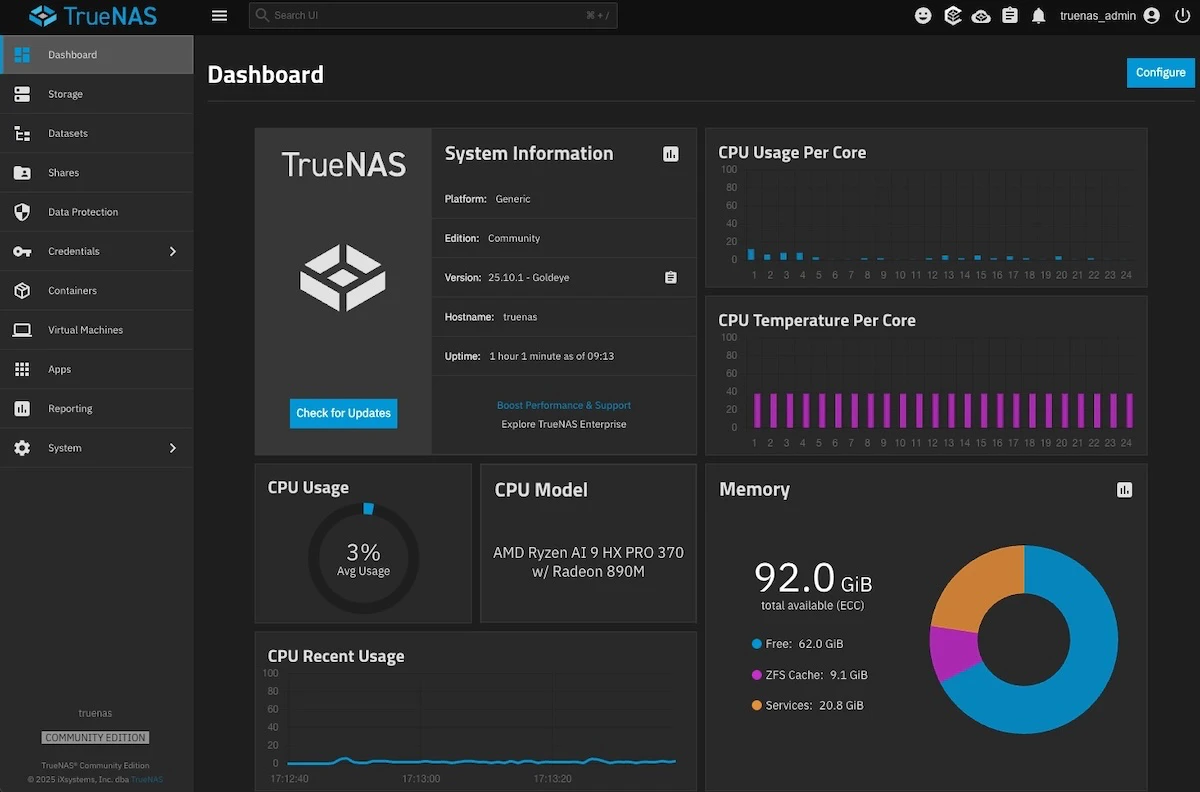
Operational transparency: CPU, memory, temperature, uptime, ZFS cache — everything visible in real time. The system doesn’t hide what it’s doing.
Documentation: Operational runbooks
Intuitive Code delivered:
- Complete runbooks (emergency procedures)
- Architecture documentation
- Disaster recovery plan
- 24×7 critical support access
If Andrew isn’t available, any competent technician can intervene.
No need to “go to the electronics store.”
Synology’s new role
The Synology wasn’t discarded.
It became the backup system.
Primary system: TrueNAS SCALE on N5 PRO
Secondary backup: Synology (offline, air-gapped)
Role reversal.
The “primary” system became secondary.
The first update: 1 minute downtime
Three weeks later, a TrueNAS update was released.
Andrew hesitated. Old habit.
But this time:
20:05 — Starts update
20:06 — System reboots
20:06:30 — Services back online
Total downtime: just over 1 minute.
No configuration lost.
No data touched.
Rollback available (but unnecessary).
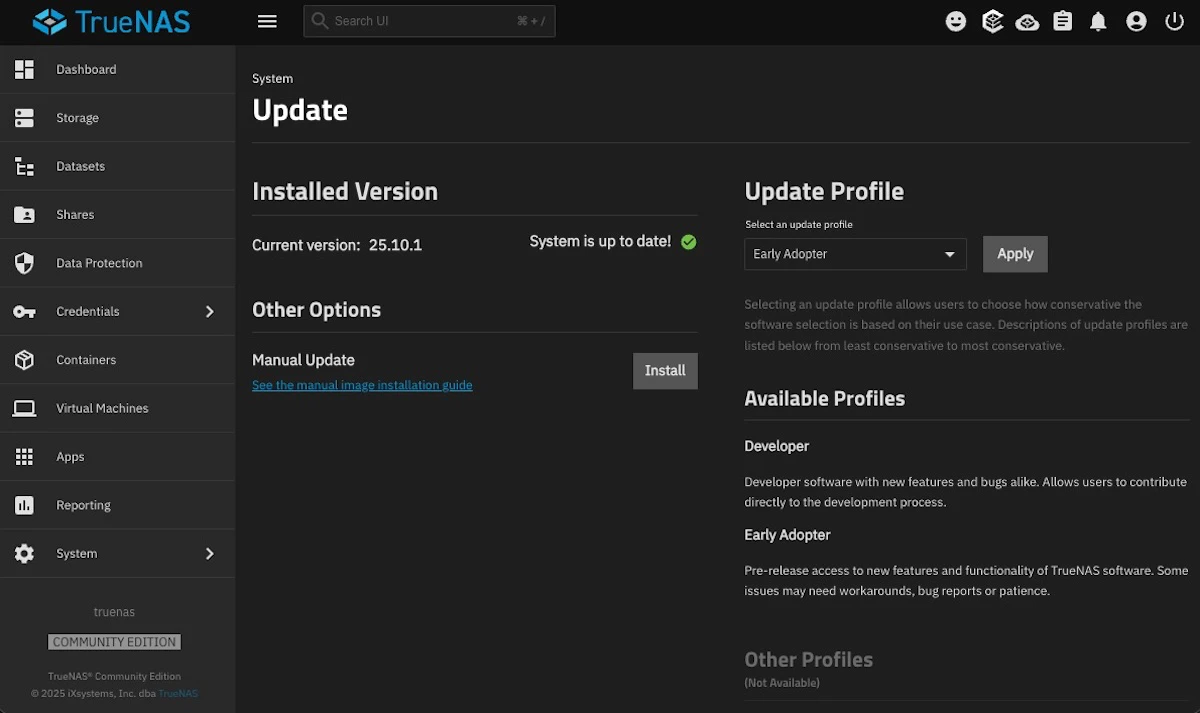
The system doesn’t hide what it’s doing. Shows status, allows choosing update profile (Early Adopter, Developer), and guarantees rollback. Operational transparency.
“It was boringly smooth. And that was the best part.”
Well-designed infrastructure doesn’t need drama.
Honest technical comparison: Synology vs TrueNAS
| Criterion | Synology | TrueNAS SCALE |
|---|---|---|
| Updates | 30+ min downtime | ~1 min downtime |
| Rollback | Limited, slow | Instant (boot environments) |
| Snapshots | Pseudo-snapshots | Native ZFS (instant, incremental) |
| Docker | Limited, pre-configured | Real Kubernetes, no restrictions |
| NVMe cache | Marginal gains | Full leverage (dedicated datasets) |
| System/data separation | Mixed | Independent datasets |
| Documentation | Forums + paid support | Runbooks + 24×7 support (Intuitive Code) |
| Vendor dependency | High | Zero (open-source) |
| Annual cost | €700–€1,200 (licenses, apps, support) | €0 (licenses) + optional support |
Common mistakes (that Andrew made)
1. Buying NVMe for Synology
❌ Wasted expense
✅ On TrueNAS: dedicated NVMe datasets (maximum performance)
2. Buying cheap Amazon HDDs
❌ No real warranty, high failure rate
✅ With N5 PRO + NVMe: may not even need HDDs initially
3. Mixing system, apps, and data
❌ Total risk on every update
✅ Separated datasets: system updates, data untouched
4. Zero operational documentation
❌ “Knowledge in the head”
✅ Runbooks: any technician can intervene
5. Untested backups under stress
❌ Work in tests, fail in emergencies
✅ ZFS snapshots: instant, verifiable, recoverable
The real cost (12 months later)
| Category | Synology (before) | TrueNAS SCALE (after) | Annual difference |
|---|---|---|---|
| Initial hardware | €2,500 (oversized) | €1,800 (N5 PRO + NVMe) | -€700 |
| Licenses and apps | €1,200/year | €0 | +€1,200/year |
| Downtime avoided | ~30h × €150/h = €4,500 | ~2h × €150/h = €300 | +€4,200/year |
| Technical rework | ~20h × €150/h = €3,000 | ~2h × €150/h = €300 | +€2,700/year |
| Professional support | Electronics store (useless) | Intuitive Code 24×7 | Peace of mind |
| Data loss risk | High | Mitigated (ZFS + snapshots) | Incalculable |
| Quantifiable total | — | — | ~€8,000+/year |
Who this matters to
This scenario isn’t exclusive to Andrew.
Applies to:
- Independent consultants with own infrastructure
- SMBs where downtime = revenue loss
- Startups where data = product
- Remote offices without dedicated IT
- Technical professionals who built systems themselves
- Any operation where 30 minutes offline costs thousands
If you’ve ever postponed an update out of fear, this article is for you.
Synology vs TrueNAS: The real difference
It’s not beautiful interface vs technical interface.
It’s not consumer vs professional.
It’s convenience vs control.
Synology sells illusion of simplicity.
TrueNAS offers correct architecture.
And when the system collapses — and it will collapse — the difference is:
- 30 minutes of panic vs 1 minute of routine
- Backup that fails vs Instant snapshot
- “Go to the store” vs Operational runbook
Conclusion
Andrew didn’t buy a better NAS.
He didn’t buy different software.
He bought correct architecture from the ground up.
And eliminated over €8,000 in annual operational risk.
The Synology still exists.
But now it serves the right purpose: backup.
The primary system is sovereign, transparent, and controlled.
Intuitive Code
We don’t sell boxes.
We don’t sell licenses.
We don’t sell illusions of simplicity.
We design infrastructure that works when others fail.
24×7 operation. Real runbooks. Sovereign architecture.
Next step
If you’ve experienced over 15 minutes of downtime on a NAS update, the architecture has failed.
If you don’t have operational runbooks, you have a black box.
If backups were never tested under stress, you don’t have backups.
Want to evaluate the real cost of your infrastructure?